AI Envisioning at Zonar

Case Study

Aerial view of illuminated intertwined highways at night with light trails from vehicles.

Exploring how AI could transform Zonar's Ground Traffic Control platform through workshops, AI-accelerated research, early stage prototyping, and customer validation.

Overview

Context
The fleet management industry was shifting fast. OEMs were tightening control over vehicle data, AI was reshaping what operations platforms could offer, and fleet customers were demanding smarter, higher-ROI solutions. Zonar's Ground Traffic Control platform had strong functionality, but its legacy architecture wasn't built for what was coming.

At the same time, internal workflows were getting in the way. Manual prototyping, late-stage feedback loops, and siloed teams were slowing things down.
Problem
Fleet managers had real-time visibility into vehicle locations, maintenance alerts, and driver behavior. What they lacked was a way to turn all that data into clear, prioritized action. They were reacting to problems instead of getting ahead of them.

Internally, the team lacked a unified approach for integrating AI into the design process, defaulting back to traditional solutions.
Solution
As a design contributor alongside Chris Hannon, Amanda Parkhurst and the rest of the product design team, I was part of a multi-phase AI envisioning initiative for Zonar's GTC platform. The work spanned structured workshops, AI-accelerated research, rapid prototyping, and customer validation at Zonar's annual conference.

Details

Length
Multi-phase initiative
Platform
Ground Traffic Control (GTC), enterprise fleet management web application
Role
Design contributor
Work
Workshop participation, UX design, concept development, persona and journey map input, early-stage prototyping, customer validation
Team

Chris Hannon, Amanda Parkhurst; cross-functional participants across Product, Engineering, Sales, and Customer Experience

" What would it look like if AI was a core part of our platform's offering?”

Defining the Solution

Approach

The work started with a reframe: instead of asking "what can AI do?" we asked "where does AI solve a real problem for our customers?" That distinction shaped everything that followed. We organized the effort around four core questions:

  1. What does our product look like with AI as part of the offering?
  2. What would the experience look like if it continuously learned and adapted to users' needs?
  3. How does the human fit in the loop?
  4. What are the ethical considerations of this kind of approach?

Starting with the problem, not the technology, kept the work from drifting into areas that weren't relevant to our needs.

What AI is actually good at
  • Prediction of future events
  • Personalization that improves the user experience
  • Natural language understanding
  • Recognition of an entire class of entities
  • Detection of low-occurrence events that change over time
  • Agent or bot experiences for a particular domain
  • Showing dynamic content more efficiently than a predictable interface
Jobs, Data & AI Framework
(Framework diagram)
Hard Skills
Heuristic evaluation
Workshop facilitation
UX & visual design
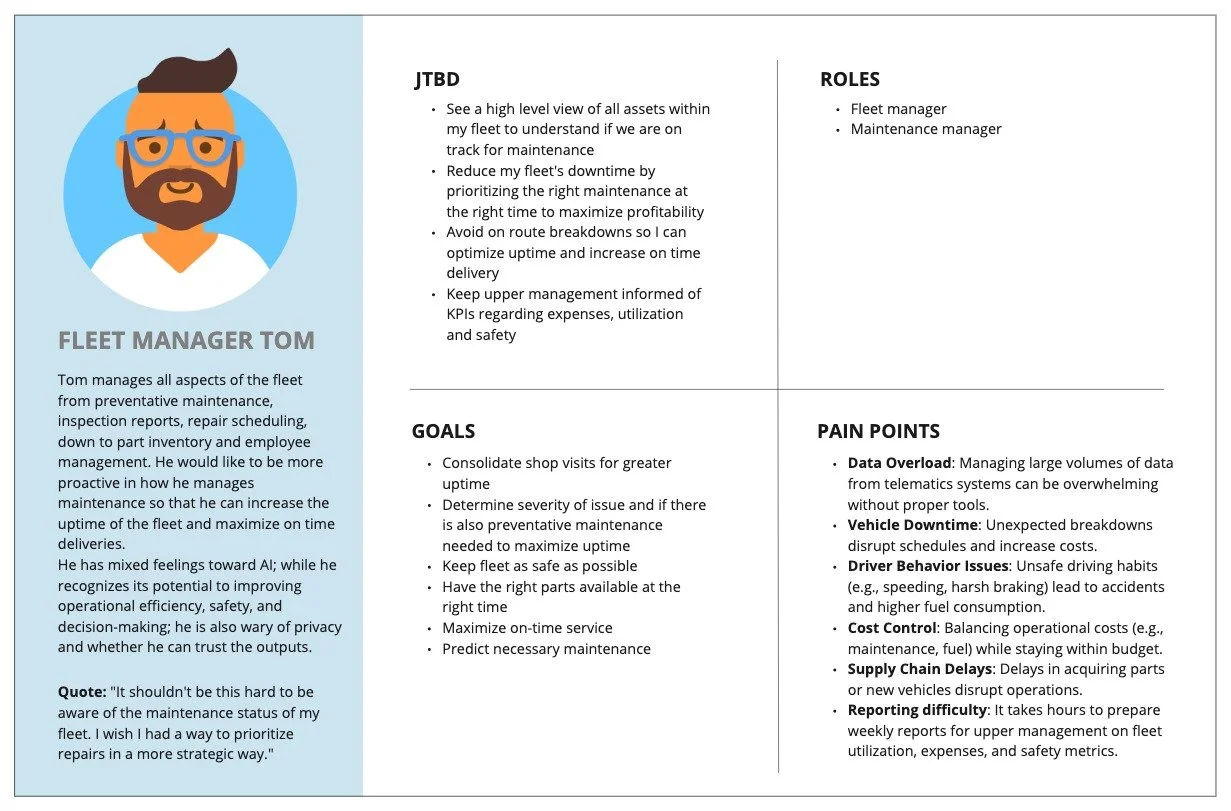
Persona development
Rapid prototyping
Customer validation
Soft Skills
Systems thinking
Cross-functional alignment
User advocacy

Process

Step 1

Empathize & Define

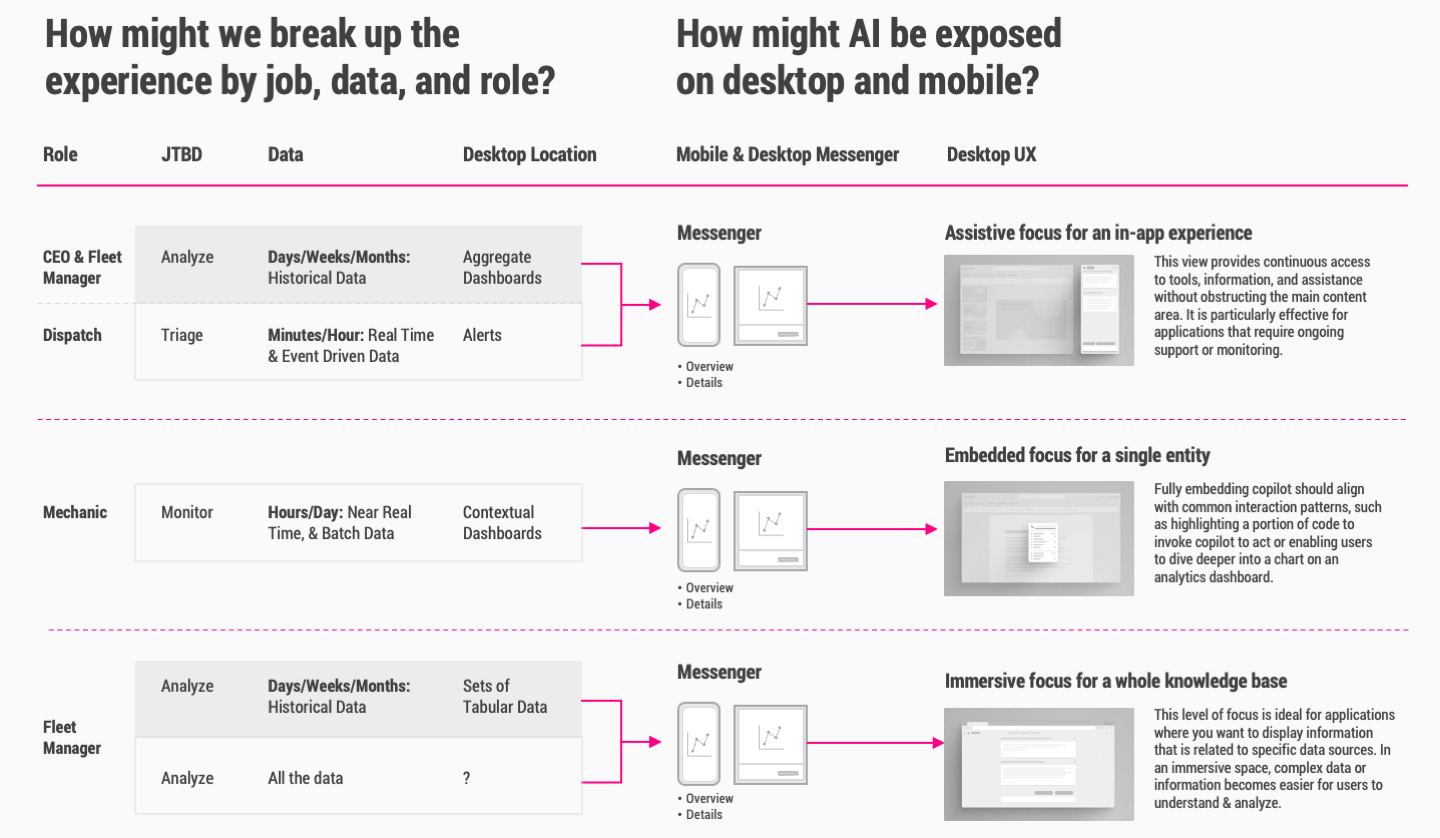
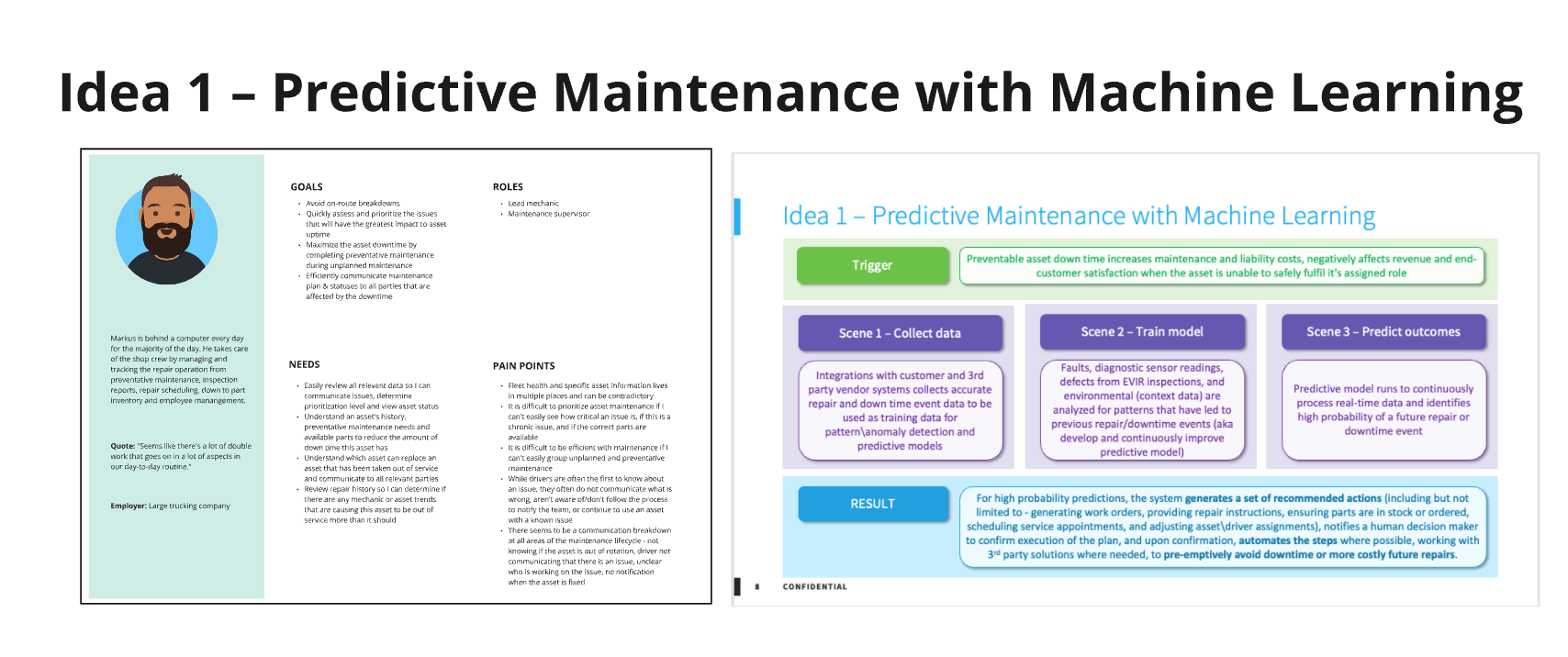
Before touching any solutions, we went deep on customer problems. Using customer care tickets, sales inputs, and backlog items, the team developed personas to anchor our thinking. My focus was the Safety Manager persona: a fleet operations professional whose day revolves around driver behavior, incident response, and daily triage.

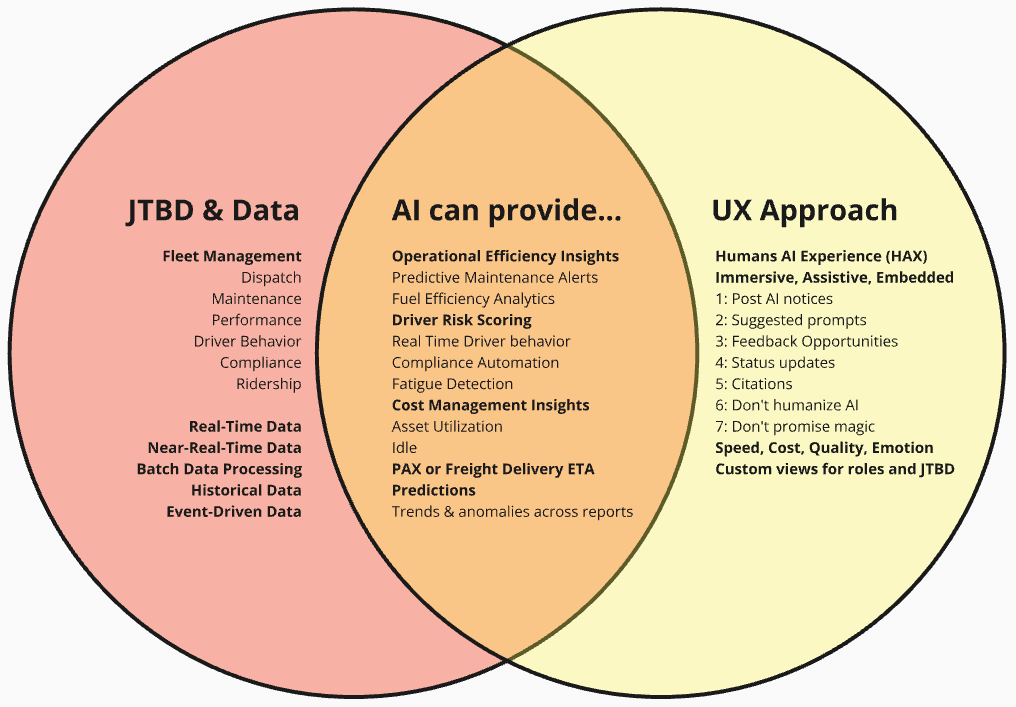
JTBD, AI Capabilities & UX Approach
(Define phase artifact)
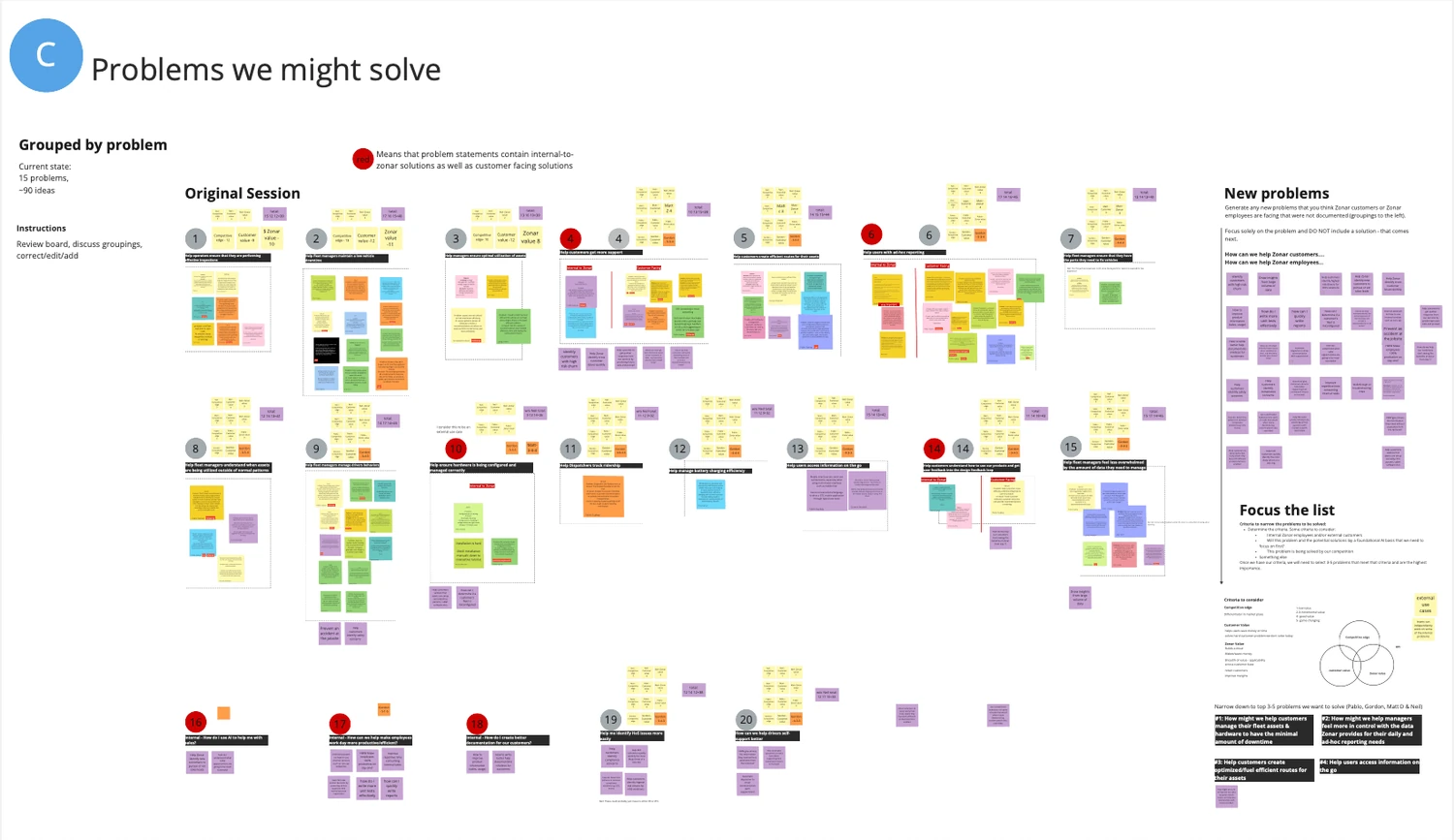
A detailed brainstorming board titled 'Problems we might solve' showing grouped problem statements with numbered sections, color-coded sticky notes, red circles indicating internal-to-zonar and customer-facing solutions, and instructions for reviewing and focusing a problem list.

A Venn diagram from the define phase, mapping Zonar's customer jobs and data types against what AI could provide and how. The overlap is where driver risk scoring, predictive maintenance, and fuel efficiency analytics started to take shape. The right circle frames the UX approach: immersive, assistive, or embedded, depending on role.
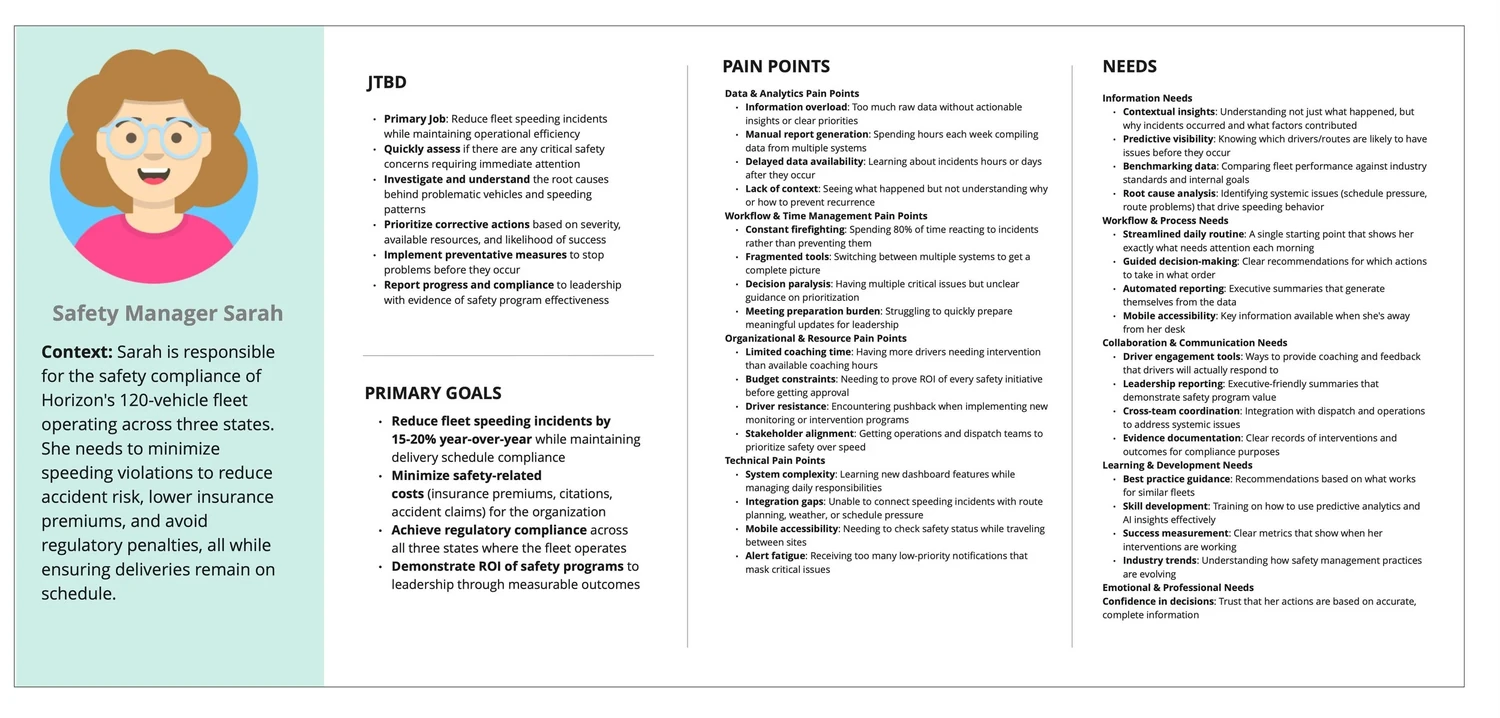
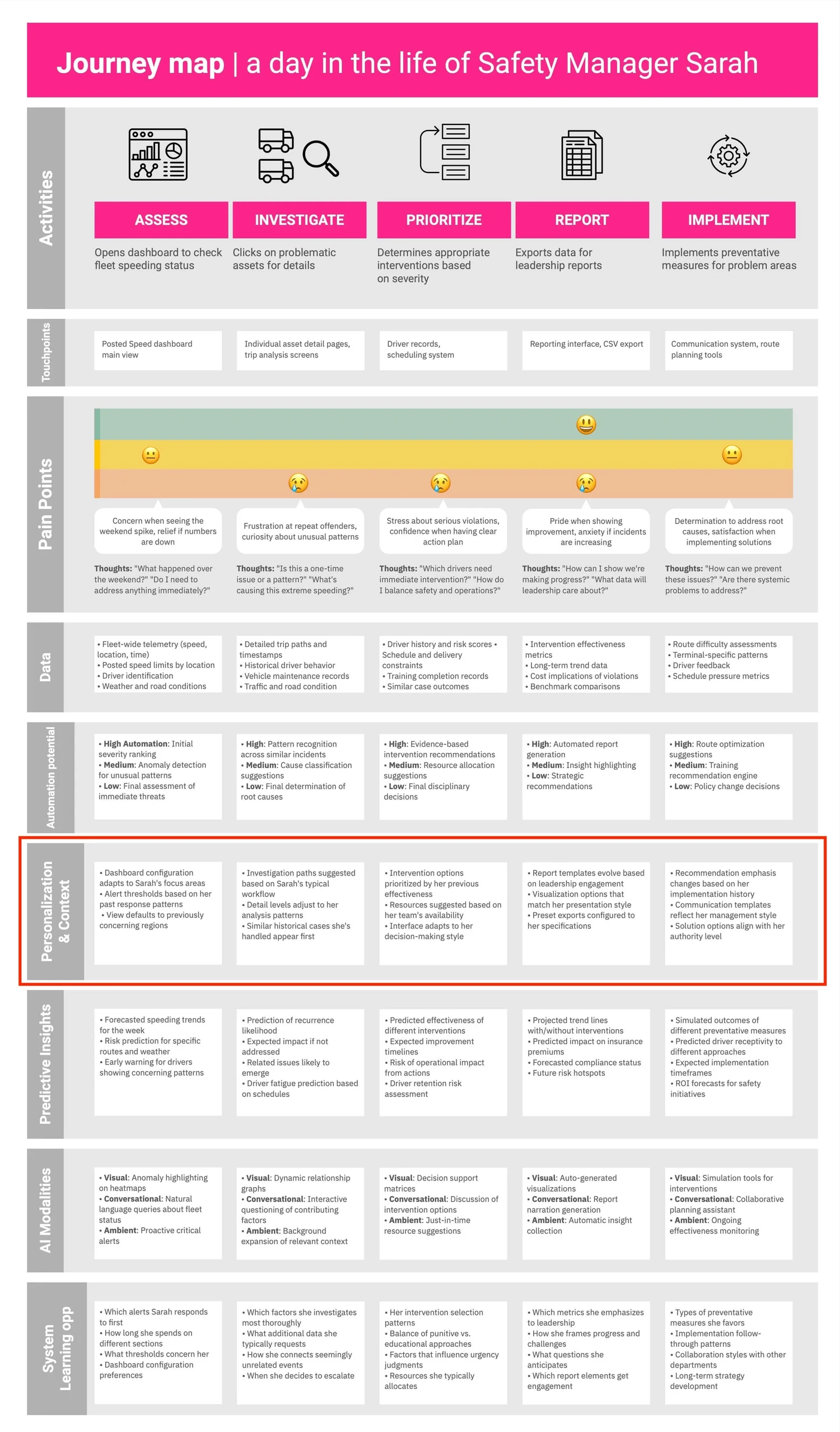
Safety Manager Sarah
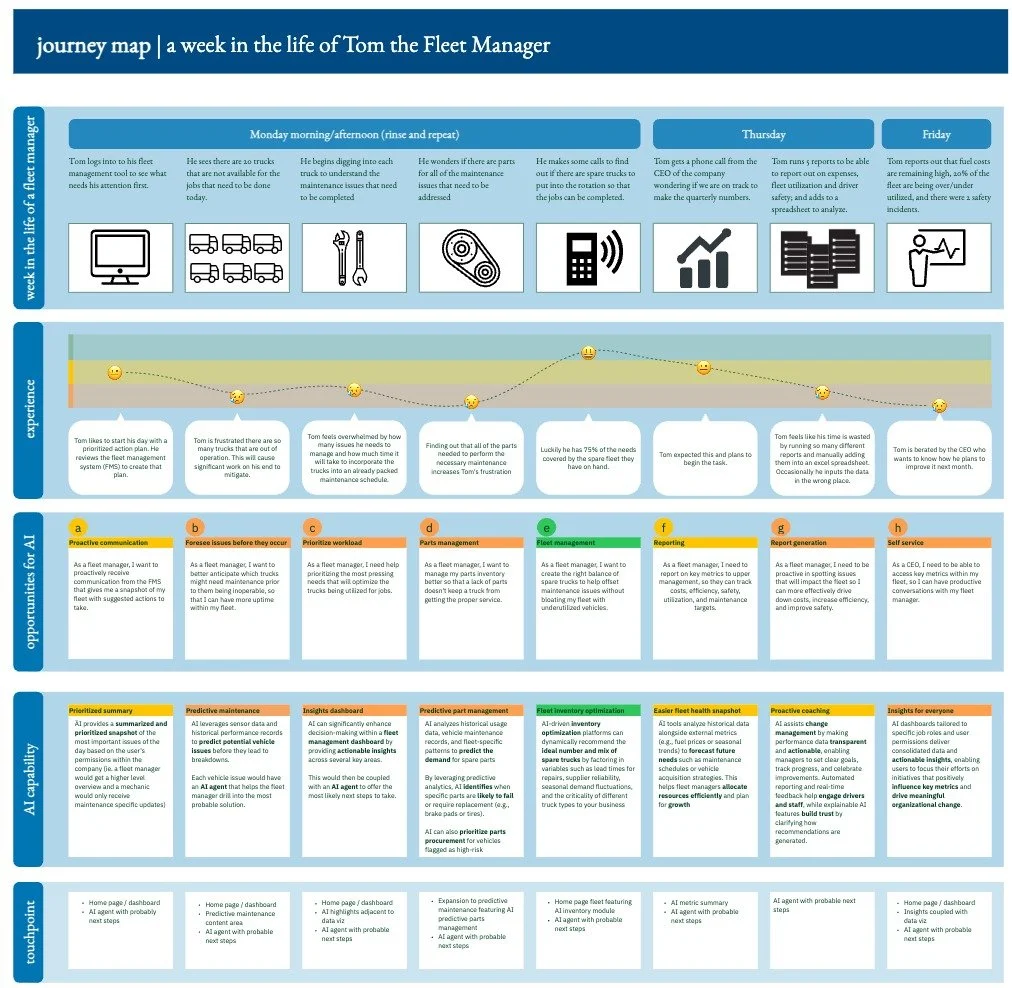
(Journey map with AI Contextual Awareness)

One key output was a Journey map built around AI contextual awareness. The idea was that the system would understand where Sarah was in her workflow and surface relevant recommendations based on her history and current state.
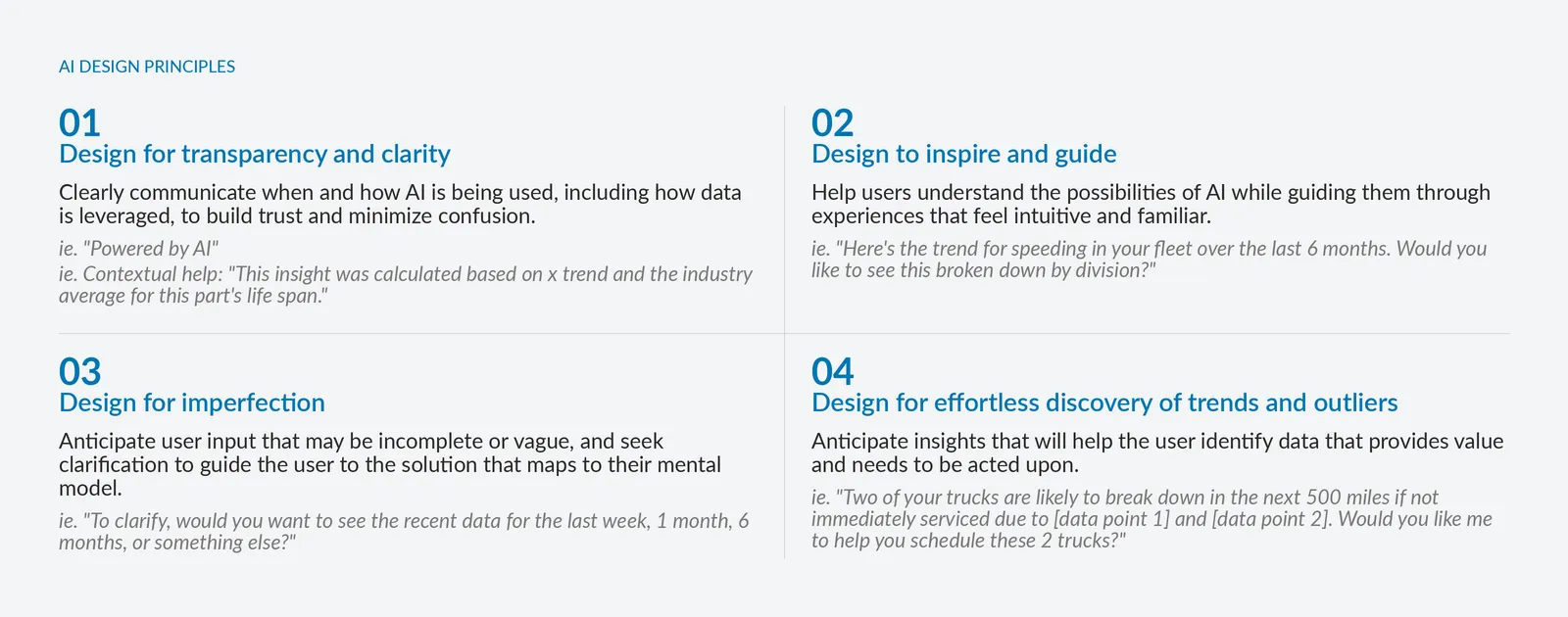
AI Design Principles

We also put together AI design principles early on, to make sure concepts stayed grounded in what actually builds user trust rather than just showcasing what the technology could do.
Step 2

Ideation

Chris and Amanda led cross-functional brainstorm sessions that pulled in product, engineering, sales, CX, and design. We used AI to analyze and cluster the outputs, mapping them against business and customer value. That let us move quickly from a wide field of ideas to a focused problem space.

Multi-day Collaborative Brainstorming
(Workshop Session)
Diagram titled 'Problems we might solve' featuring grouped problem statements with color-coded sticky notes and icons, categorized into numbered sections and a list for new problems to generate.

Over 90 ideas across 20 problem categories out of one session. We used AI to cluster and evaluate them against competitive edge and customer value, which made it possible to prioritize in the same meeting.

Objectives & Assumptions
(Story Map)

One of the more useful things we built during this phase was a Story Map that captured our original objectives, key assumptions, and the unknowns we still needed to validate. When you can generate concepts this fast, it's easy to lose the thread of what you're actually solving for. The Story Map kept us honest.
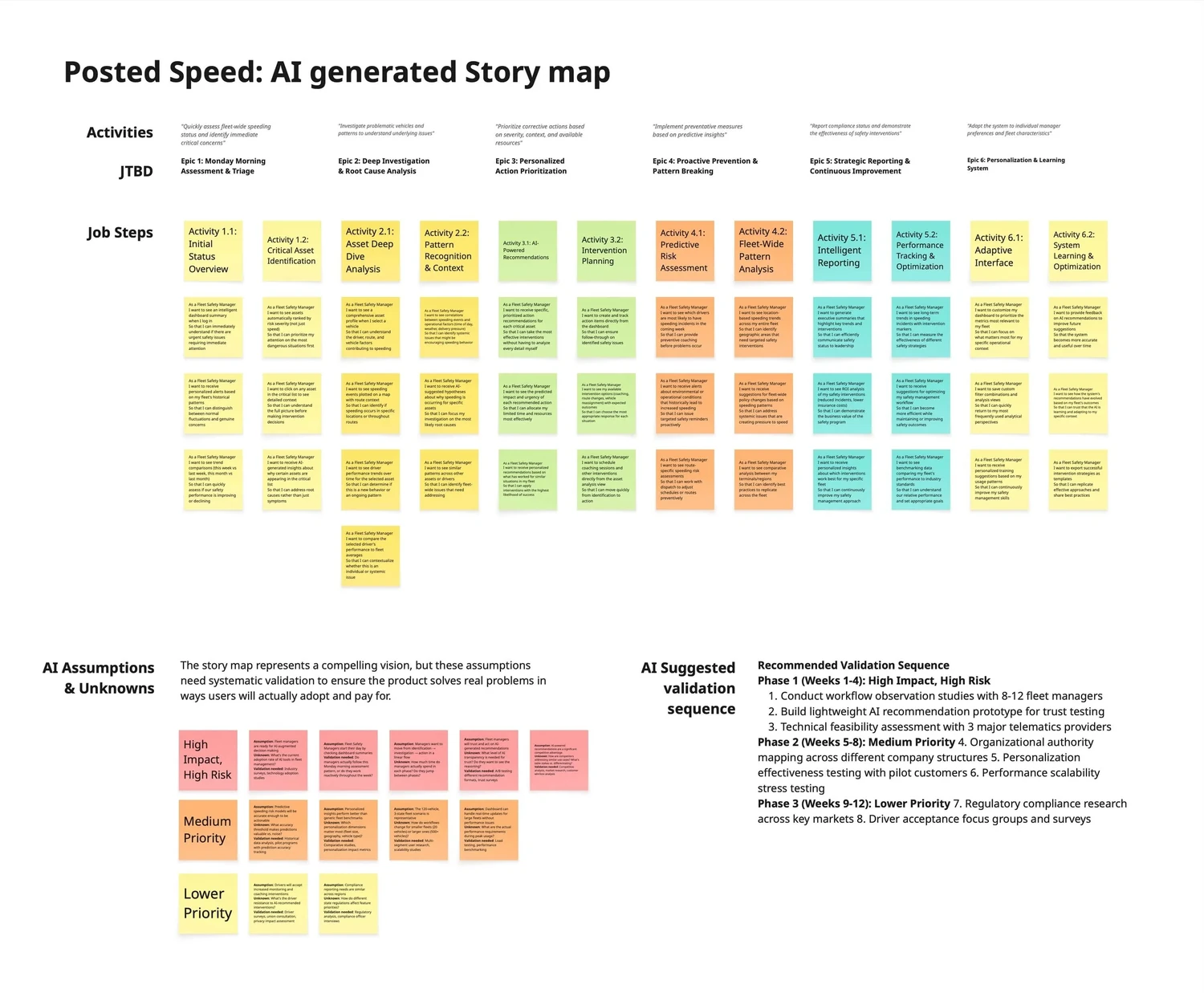
Story map titled 'Posted Speed' showing activities and job steps for fleet safety management divided into six epics, with color-coded sticky notes outlining tasks, user stories, and AI assumptions with recommended validation sequence and priority levels.

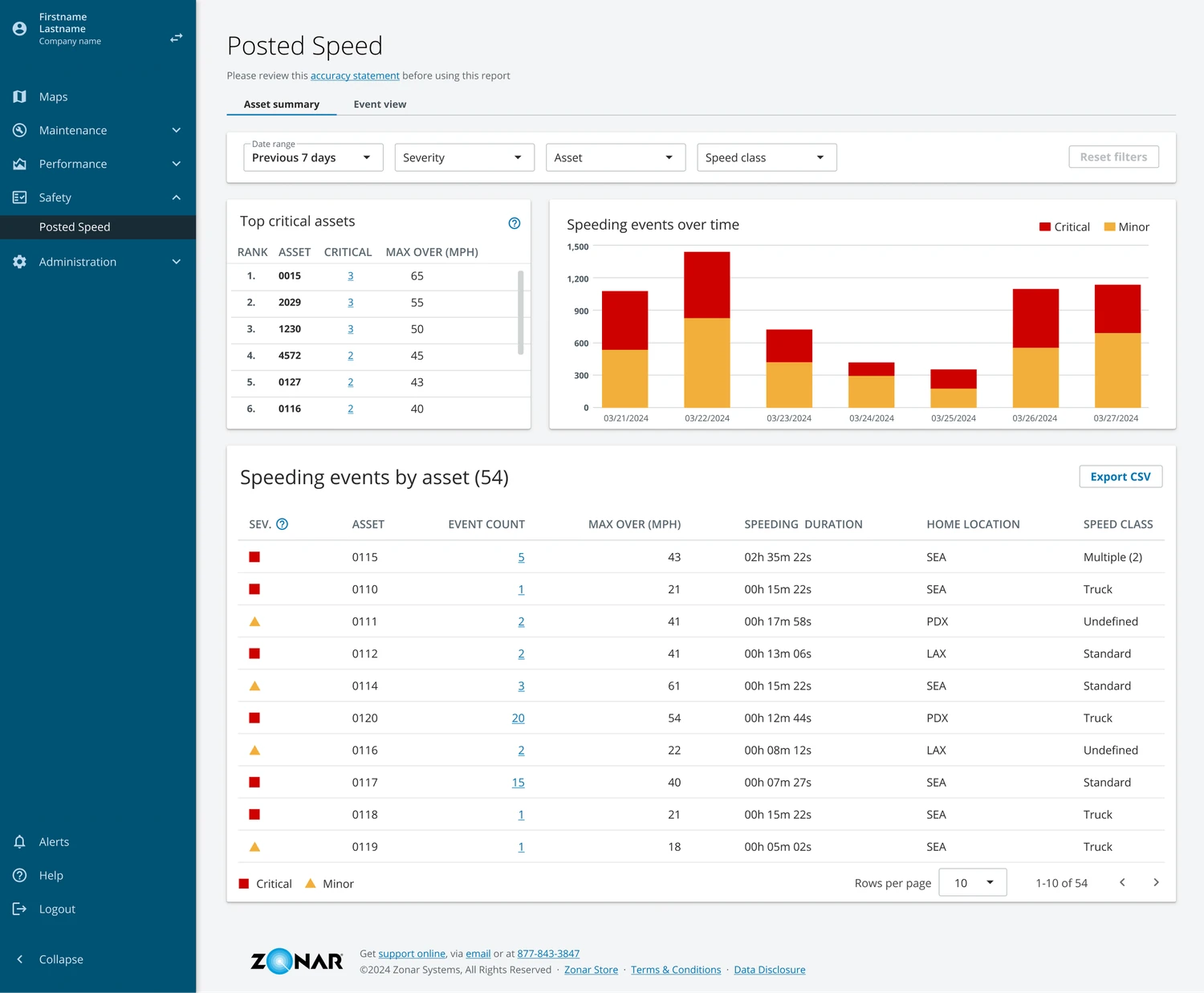
The Story Map for Posted Speed, built with AI assistance. Activities and job steps on one axis, a phased validation plan on the other. Assumptions ranked by impact and risk so the team knew what to test first.
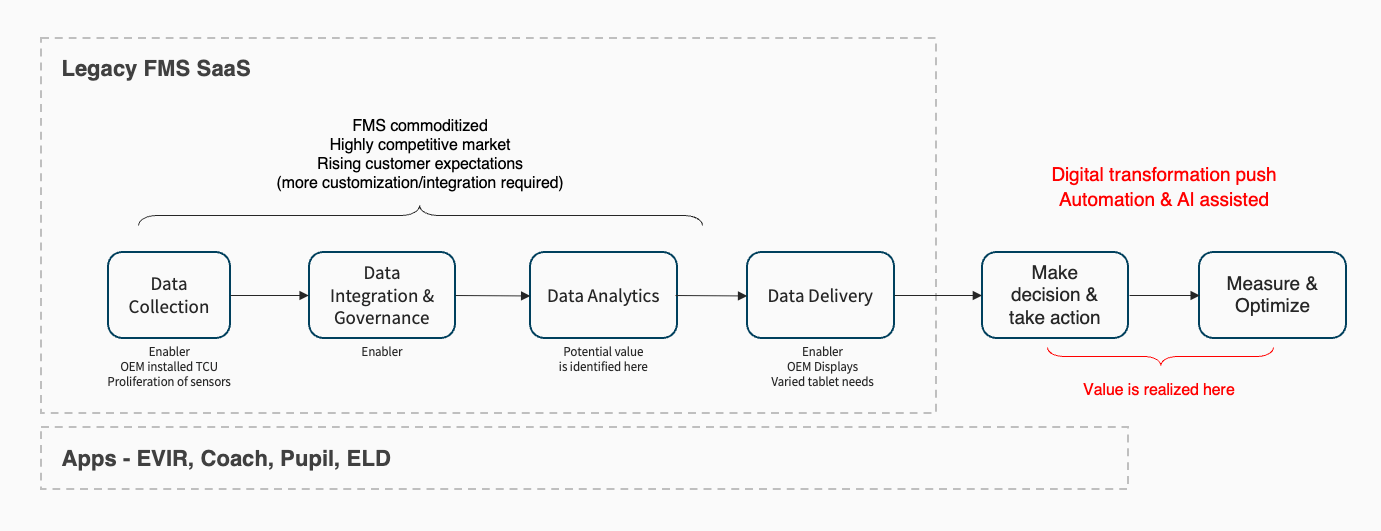
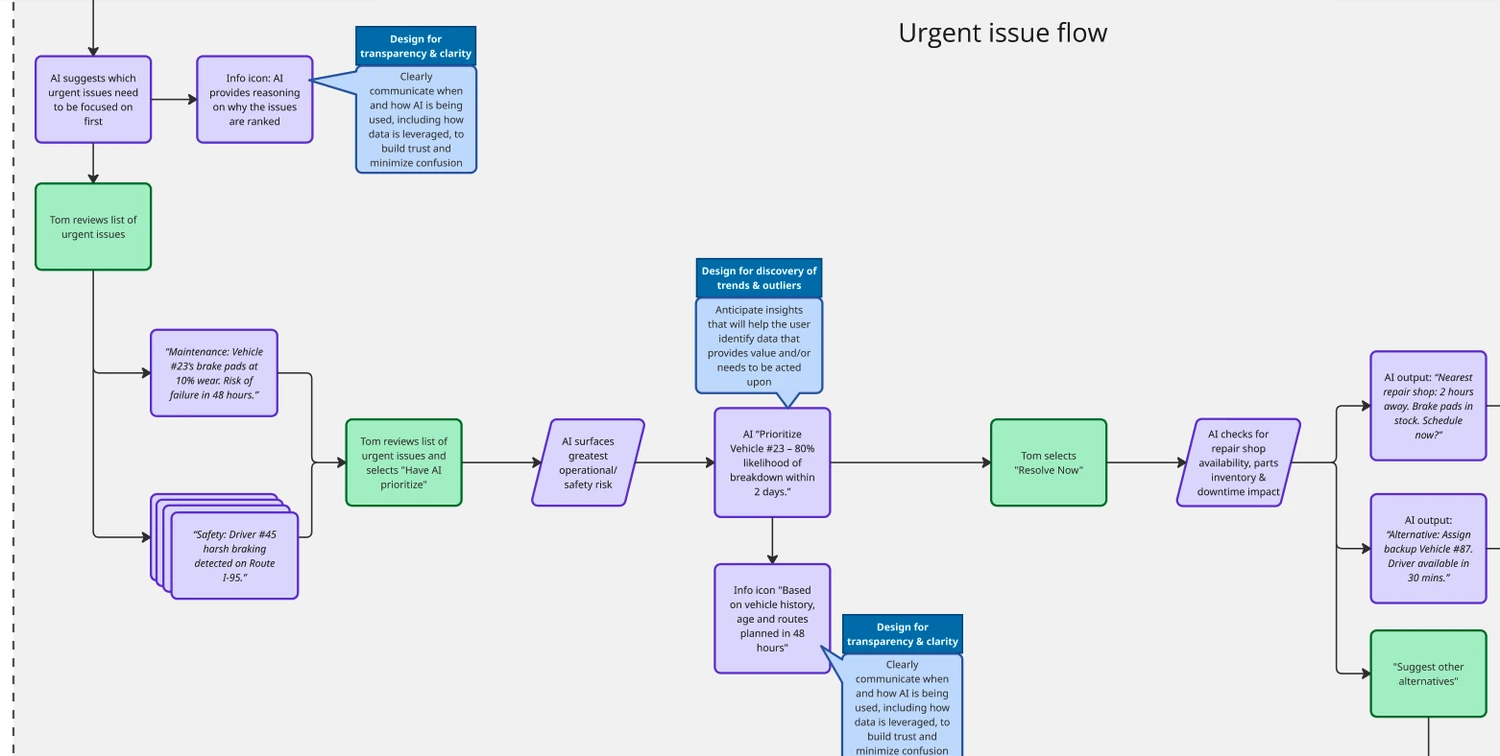
AI Touchpoints in User Flow
(User flow)

Once we aligned on the target problem space, speeding and driver behavior, we mapped user flows to identify where AI could add the most to the customer experience.
Step 3

Early-Stage Prototyping

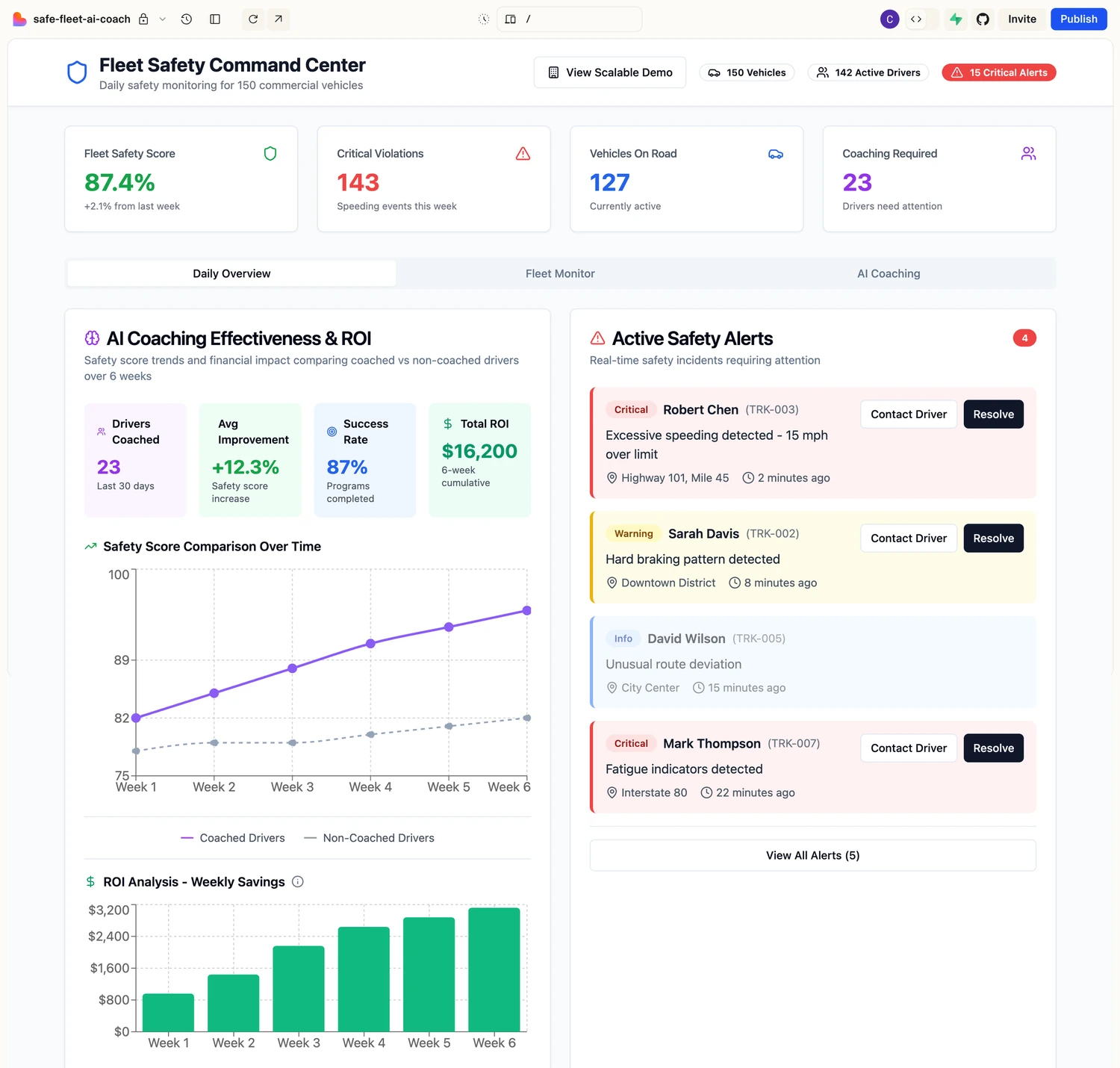
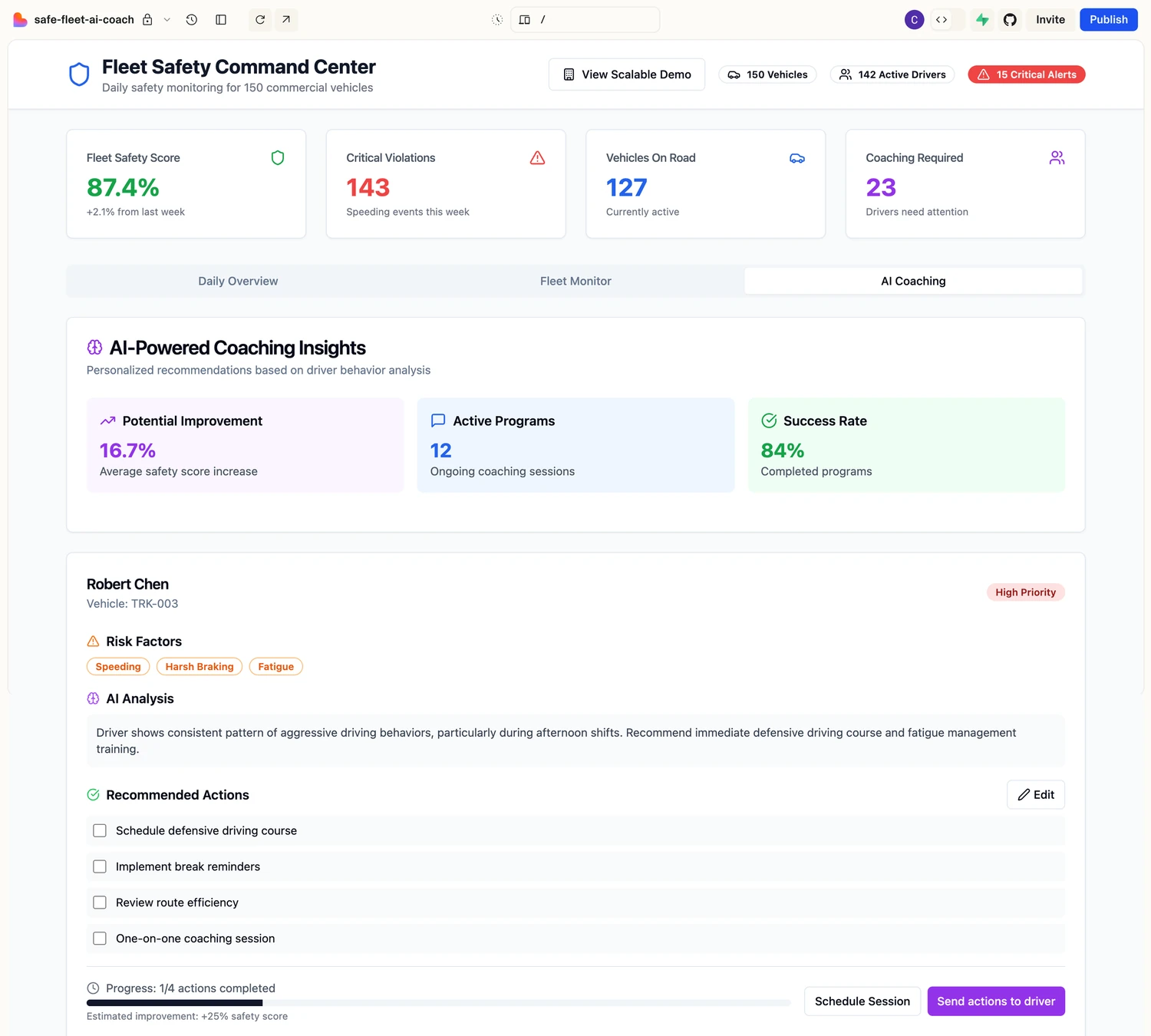
Rather than waiting for high-fidelity designs, we used AI-powered tools to build interactive prototypes during ideation itself. Using Lovable.dev, a small team put together low-fidelity prototypes in a fraction of the time traditional methods would have taken. Engineers and PMs gave feedback in real time as things evolved.

We shared them immediately with internal stakeholders and customers, which let us validate assumptions and catch issues well before development started.

Step 4

Envisioning Solutions

With a validated problem space and early prototypes giving us direction, we shifted focus to how AI UX patterns could fit into the existing GTC experience. This wasn't going to be an AI-first product. It was a retrofit, layering AI into a platform with a lot already going on. We looked at reference patterns from Microsoft's HAX Copilot and alerting systems like Tableau Pulse.

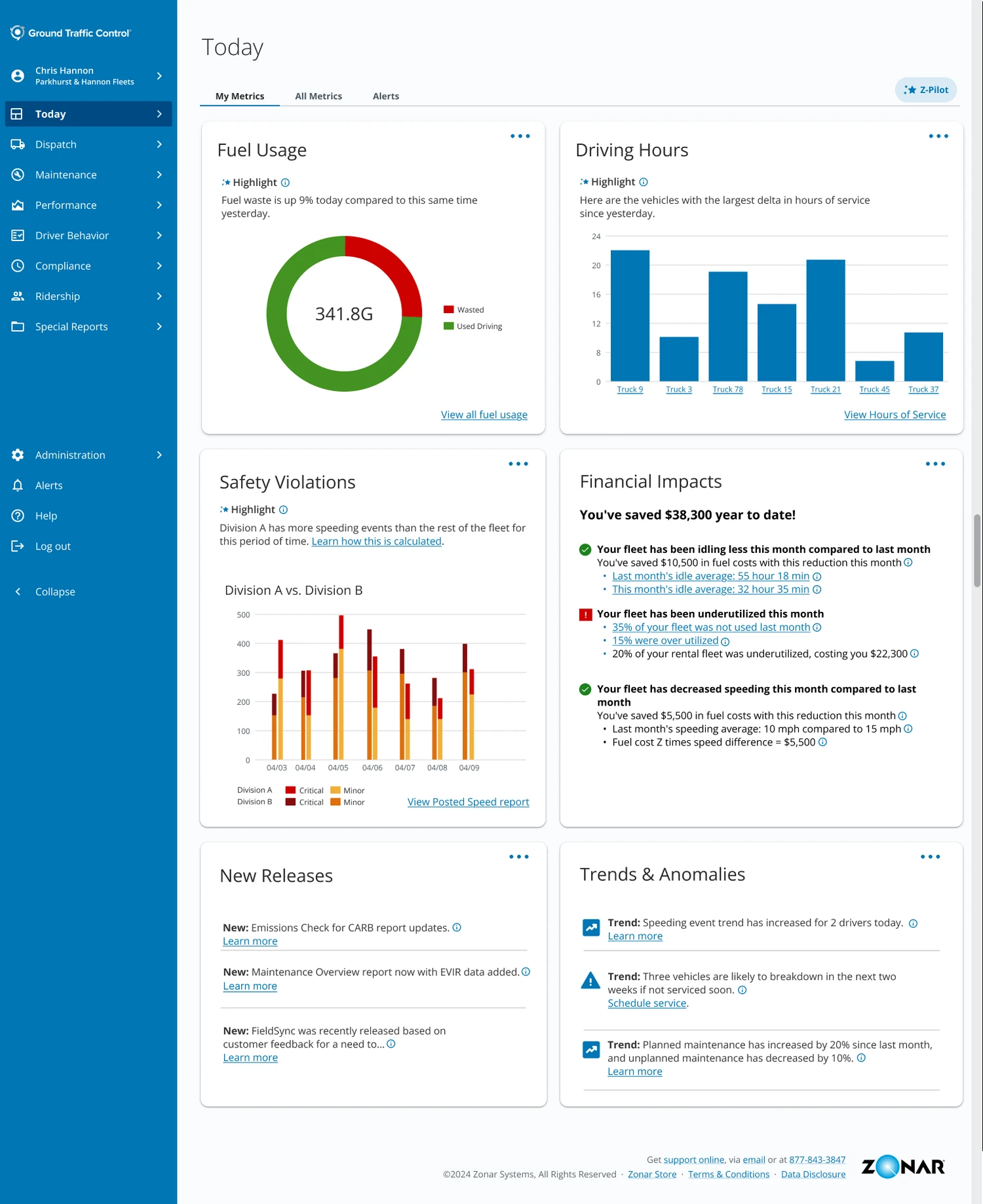
AI-First Landing
(Dashboard Concept)

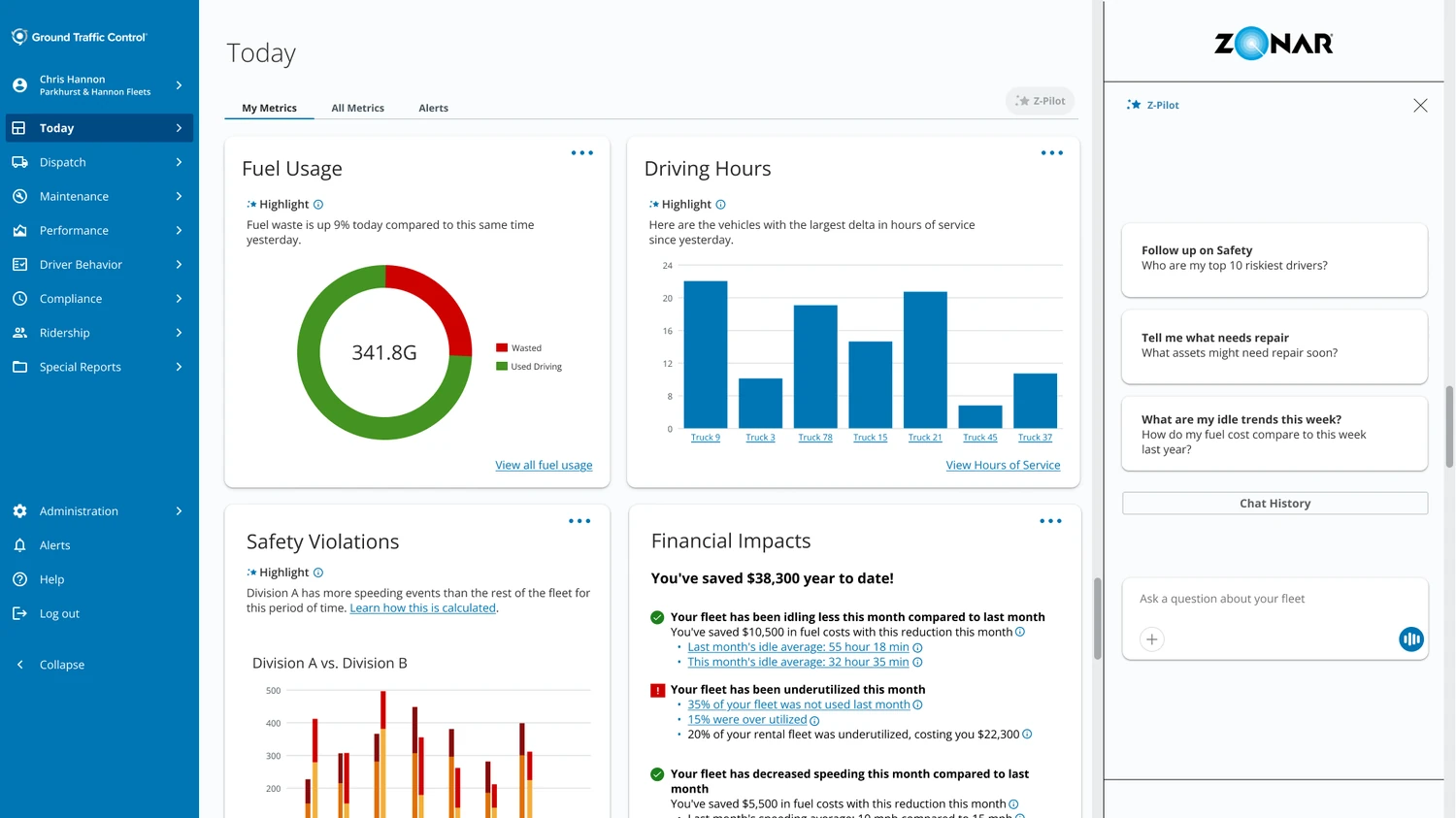
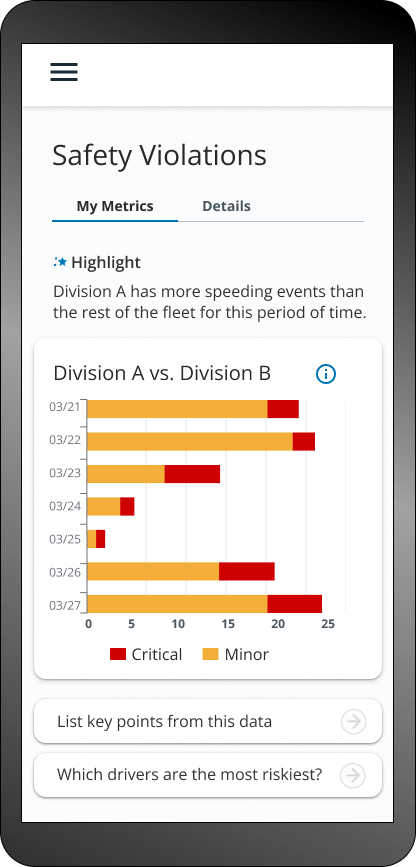
Sarah's job requires triaging her fleet every day. She doesn't just need to see where assets are on a map. She needs to know what requires her attention and why. The new dashboard concept introduced a personalized "My Metrics" view for fleet safety. From there, she could open Z-Pilot, Zonar's AI assistant, to ask questions, pull up AI-generated highlights, or act directly from recommended modules.
Speeding Violations Workflow

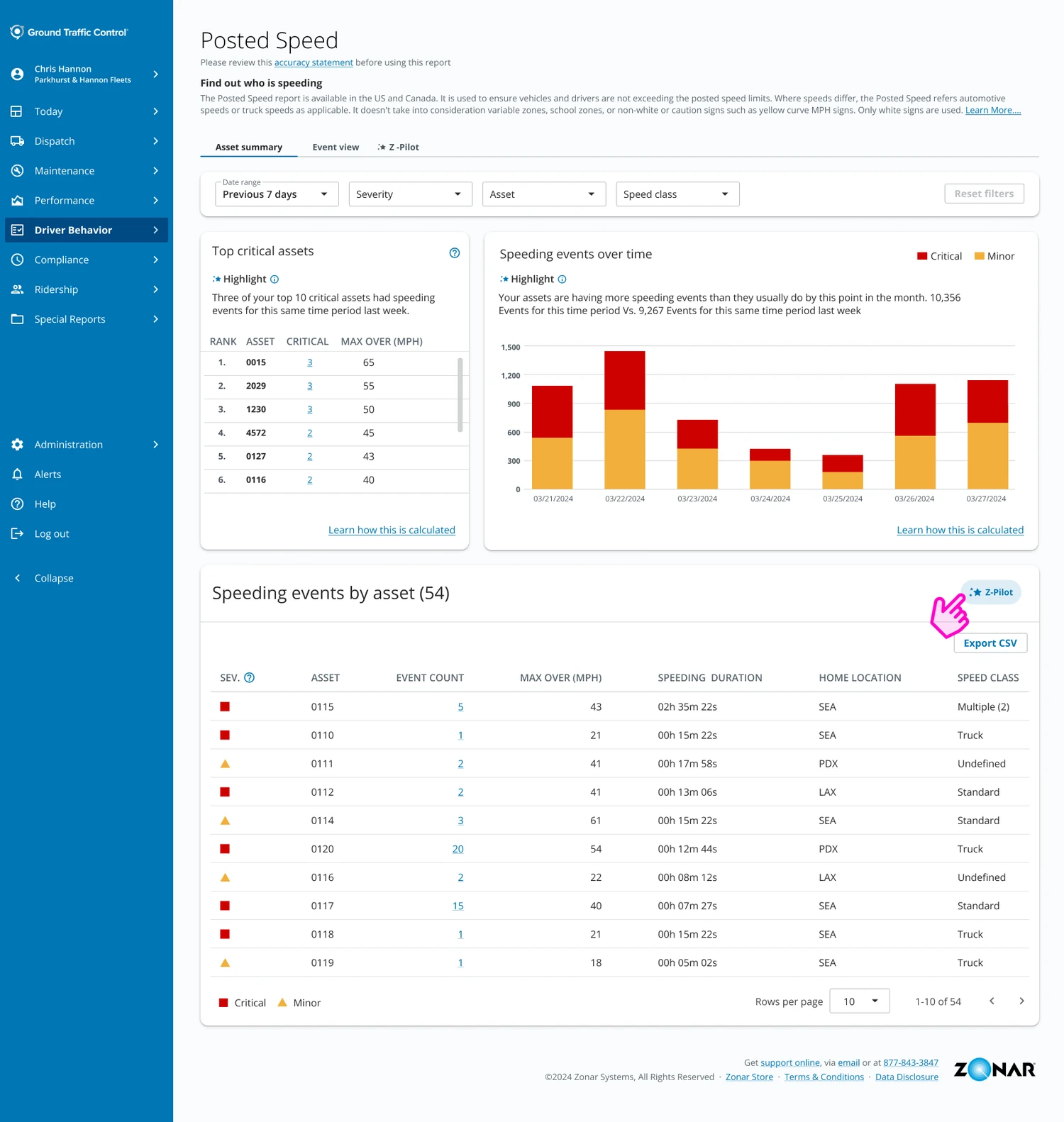
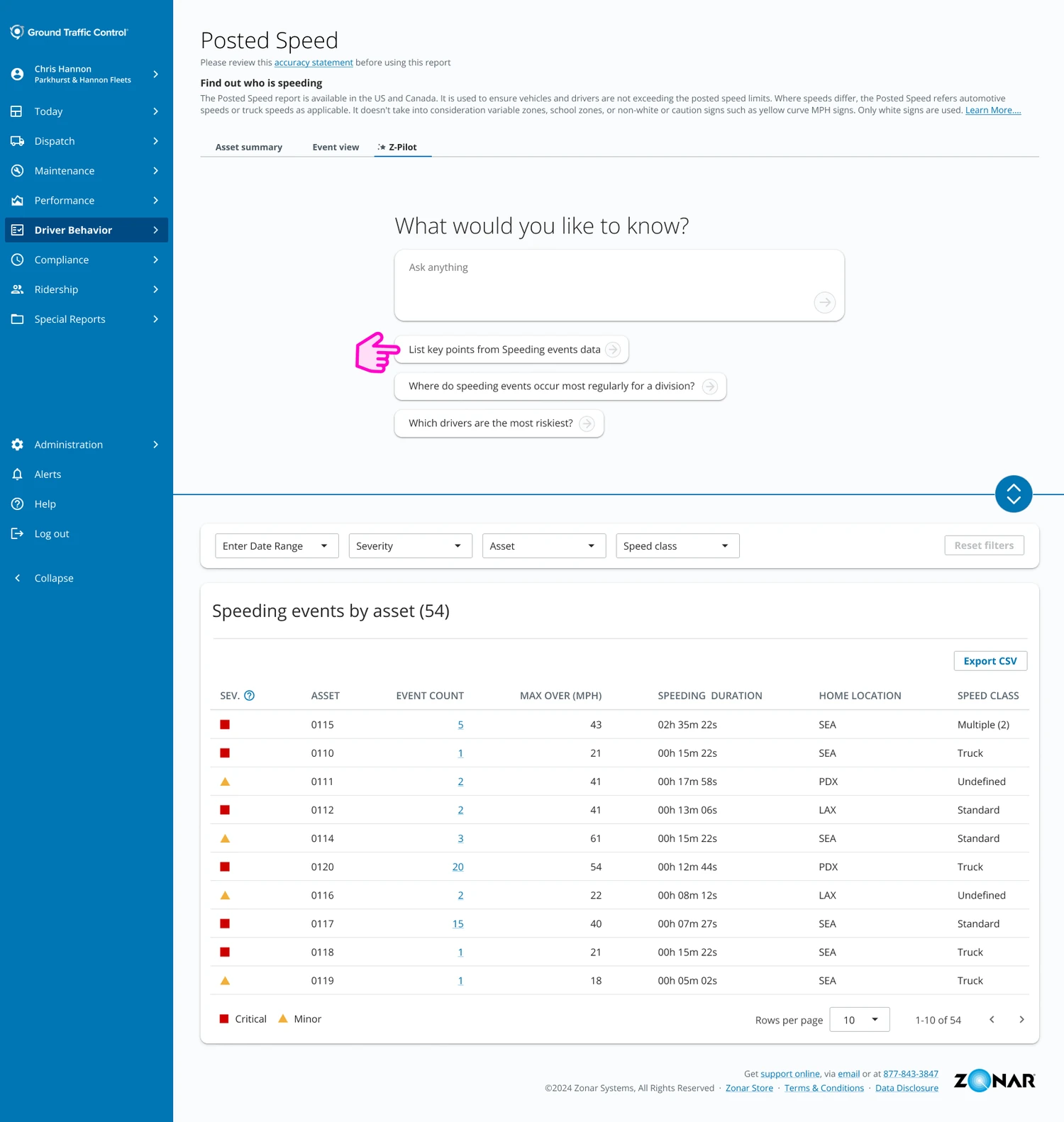
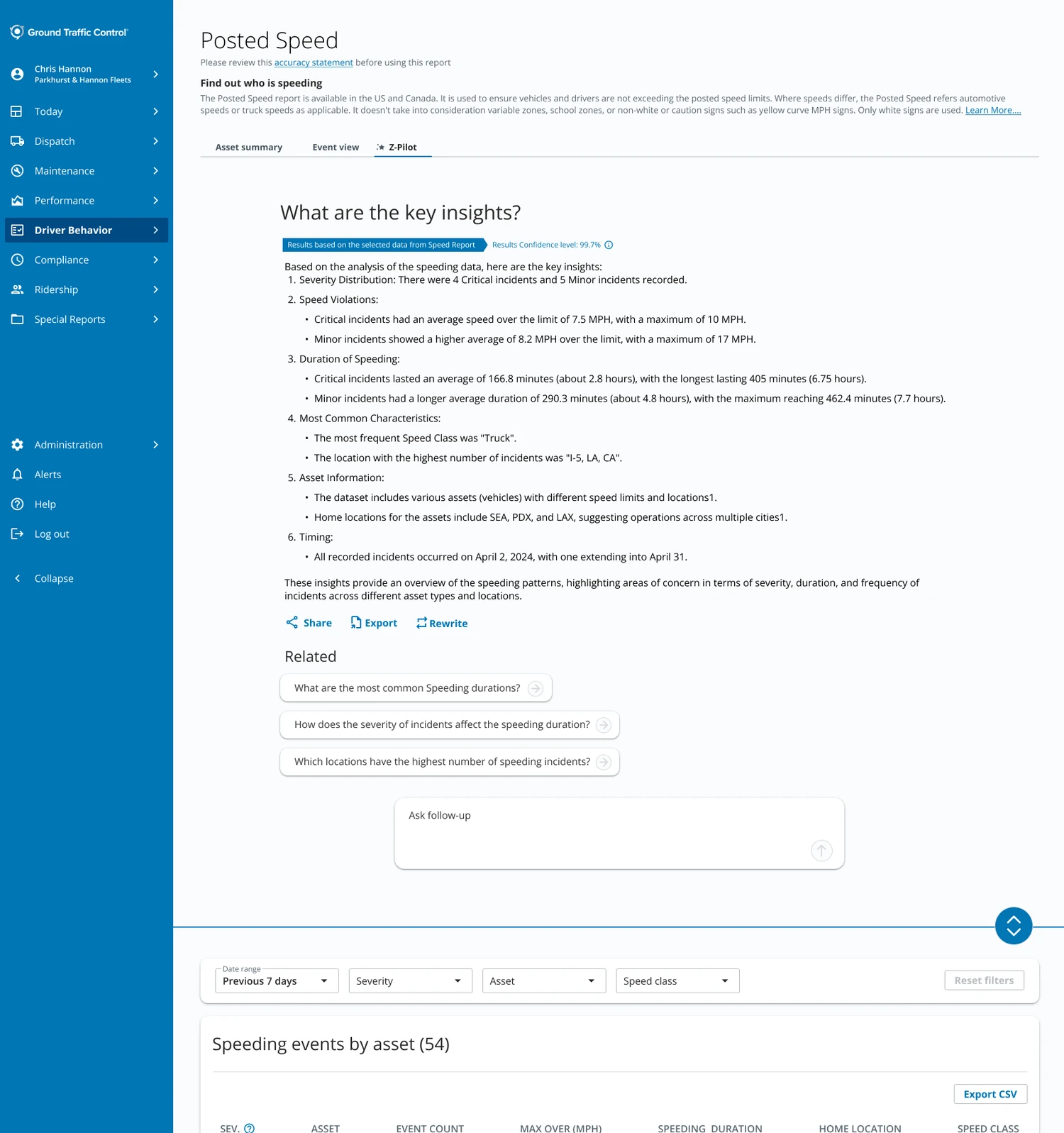
The speeding workflow followed Sarah across surfaces. A mobile alert flagged a trend in driver behavior. On desktop, the Posted Speed report pulled up embedded AI analysis right alongside the tabular data. In the Z-Pilot immersive view, Sarah could query the data directly and get AI-guided recommendations while still having the raw data a scroll away.

Safety Alert — Metrics & AI Prompts
(Mobile alert)
Step 5

Agentic Concepts & Customer Validation

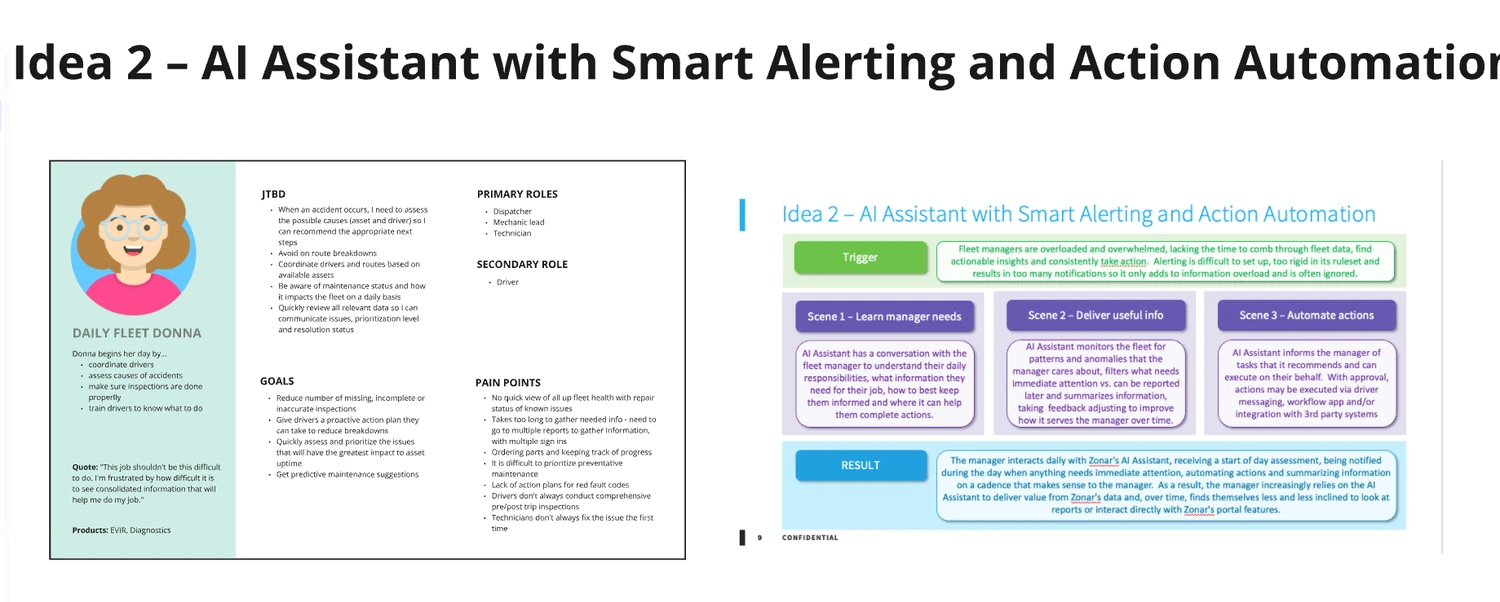
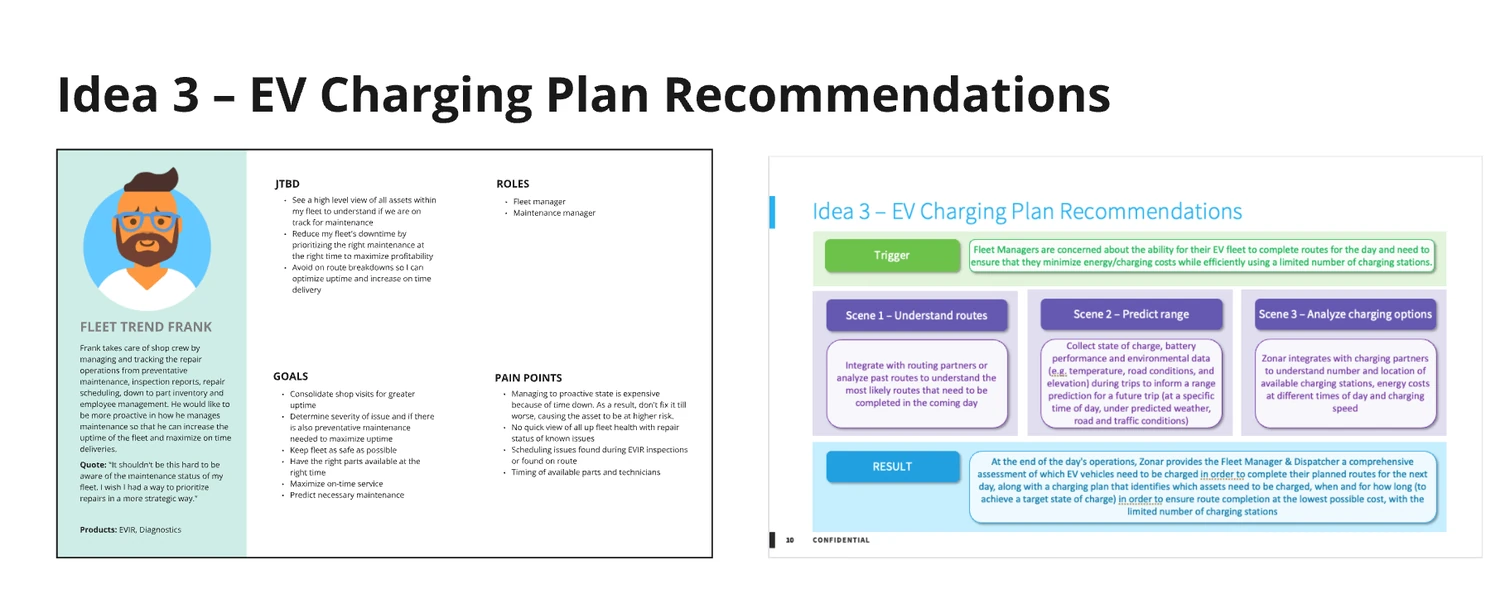
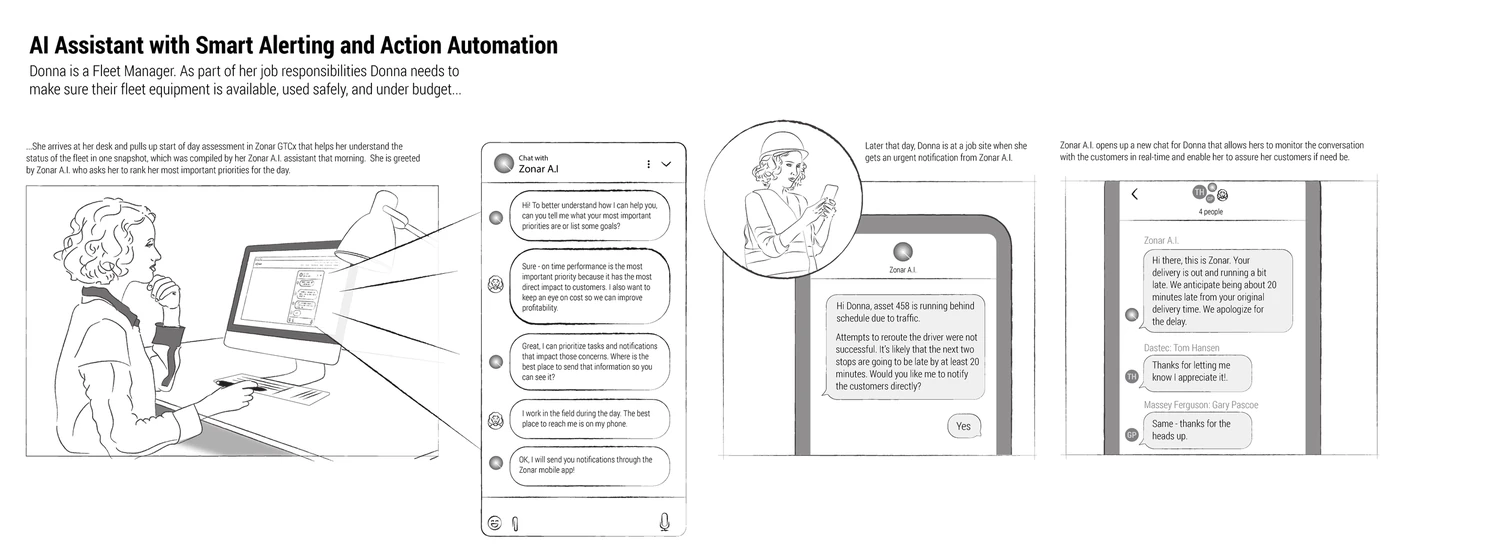
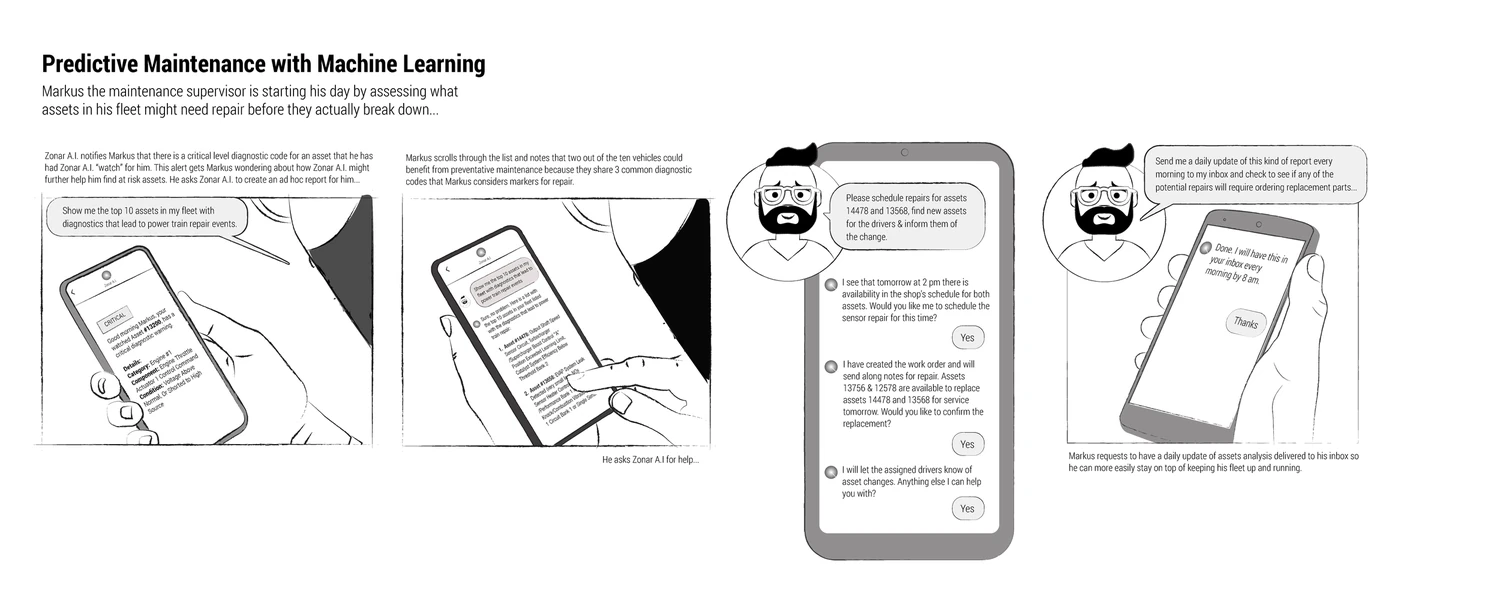
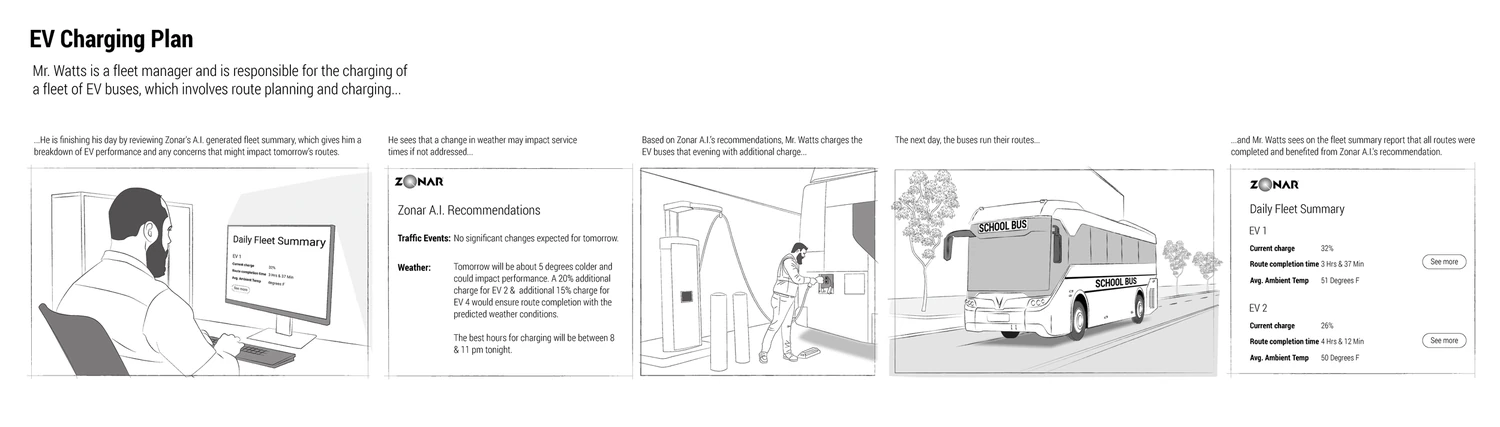
Beyond the Safety Manager scenario, the team developed three additional storyboard concepts, each tied to a distinct customer archetype. They ranged from improvements to Zonar's existing platform to entirely new solutions that AI makes possible. These were tested at Zonar's annual Zonar Together Conference.

Each concept followed a human-in-the-loop model: AI analyzes the situation and helps users make better decisions, but a person stays in control.

Donna
(Storyboard)

Outcomes & Impact

50%

Faster Concept-to-Validation

Early prototyping and AI-accelerated research cut time to validated concepts in half.

Day 1

Cross-Functional Alignment

Engineering, PM, and design were aligned from day one, not after handoff.

↓Rework

Reduced Development Costs

Catching issues early in prototyping prevented costly course corrections once development began.

  • Higher-quality deliverables: The personas, journey maps, story maps, and prototypes were richer and more actionable than what traditional methods typically produce.
  • Customer validation: Conference attendees engaged genuinely with the concepts, especially around predictive maintenance and smart alerting. The mixed reactions around AI readiness were actually useful in thinking through how to sequence the roadmap.
  • AI as a creative partner: Teams came away more engaged and more creative, treating AI as a tool that helped them do better work.

Retrospective & Reflection

Learnings
  • Starting with the problem, not the technology, kept the work focused and credible. AI use cases that came out of real customer pain points were stronger than anything generated from capability-first thinking.
  • Rapid prototyping early in the process changed the quality of cross-functional conversations. Engineers and PMs engaged differently with something they could click through.
  • Keeping a written north star during fast-moving ideation was more valuable than it seemed at the start. The Story Map prevented scope creep without slowing momentum.
Next Steps
  • Prototype testing with Safety Managers: Validate Z-Pilot interface concepts with 8–10 Safety Managers
  • Data audit: Assess quality and completeness of telematics data for ML training; identify gaps for key personas
  • Feature roadmap prioritization: Sequence the three agentic concepts based on technical complexity vs. business impact
  • Apply the same early-prototyping and AI-accelerated research model to other product areas at Zonar
My Takeaway

I came into this project as a contributor, not a lead. My main focus was the Safety Manager persona, along with design input and feedback across sessions as concepts evolved. The prototyping and facilitation belonged to Chris and Amanda.

That vantage point shaped what I took away.

Watching the team use AI to cluster 90 ideas in real time, then seeing engineers engage with a Lovable.dev prototype the same day it was conceived, shifted how I think about fidelity and speed. I'd spent years treating them as trade-offs. This project suggested they don't have to be. The persona work confirmed something I already believed: start with the user's actual job, not the technology's capabilities.

What I'd do differently: Document during the work, not after. The Story Map was valuable because it was built in the moment. A lot of the most useful thinking, the pivots, the in-session debates, didn't make it into the retrospective because it was assembled later. Going forward, I'm capturing decisions in real time so the case study is a byproduct of the process, not a separate project that follows it.